Free early-user beta. Your feedback shapes what ships next. Open an issue on GitHub

Messy folders, turned into tidy collections.

Sheaf reads what is inside your files, groups them by what they are about, and lets you find anything by person, place, thing or idea, not by file name. It is free, needs no account, and the AI runs on your Mac. You approve every move and can undo all of it.
macOS 14+, Apple Silicon
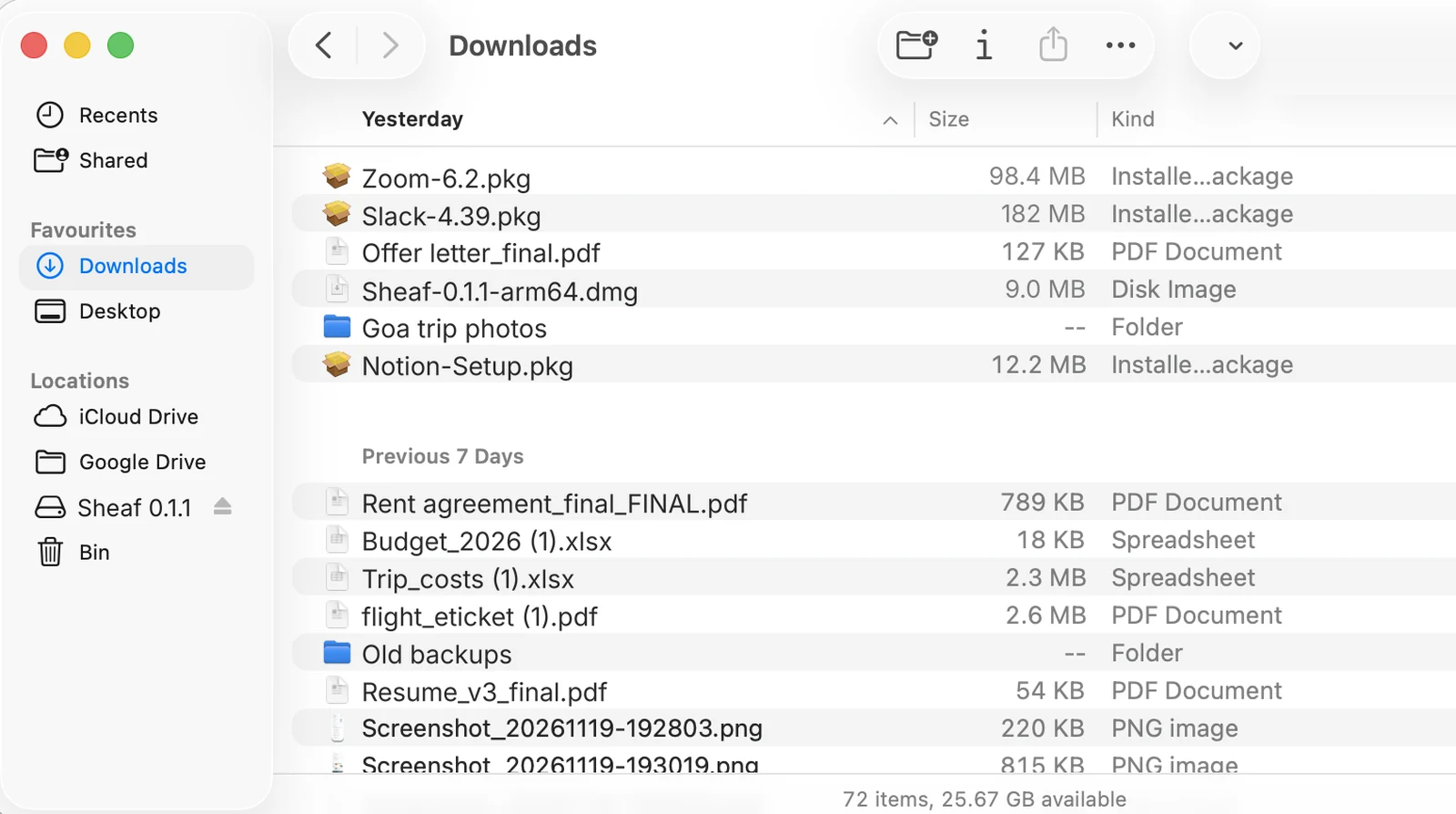
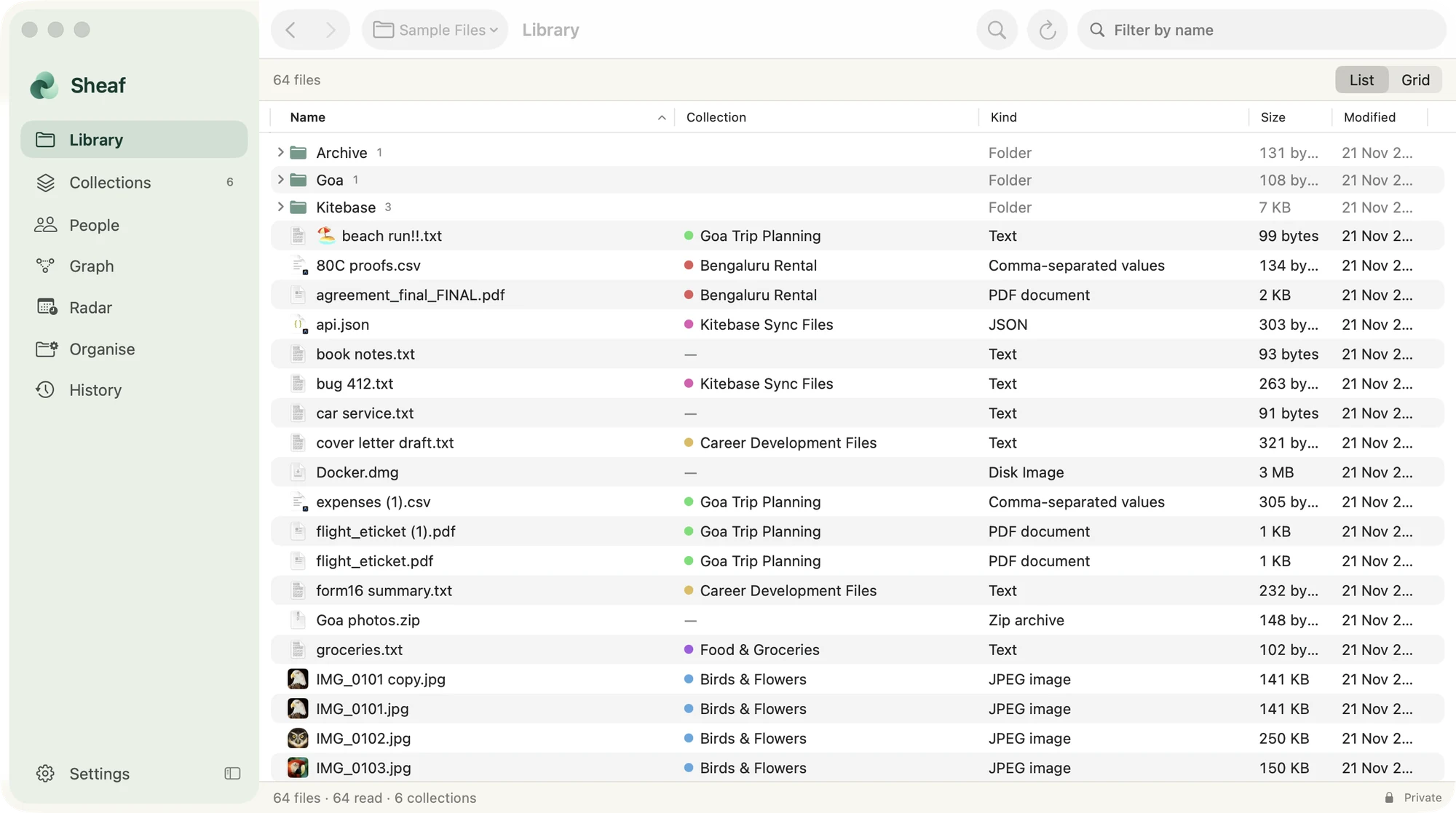
A Downloads folder in Finder: installers, PDFs, spreadsheets and screenshots in no particular order The Sheaf app showing the same kind of folder sorted into named collections, with the list of files in each
Before: a typical Downloads folder in Finder (file names changed). Installers, PDFs and screenshots, newest first, nothing grouped.
After: every file placed in a collection named for what it holds. These are the invented sample files that ship with Sheaf, so you can try every screen before it reads your own.

Inside the app

Screenshots of the beta running on the sample folder of invented files, with local models on a Mac.

Your folder, summed up

How many files, how many collections, and every person, place, thing and idea Sheaf found inside them. Click any name to see every file it appears in.
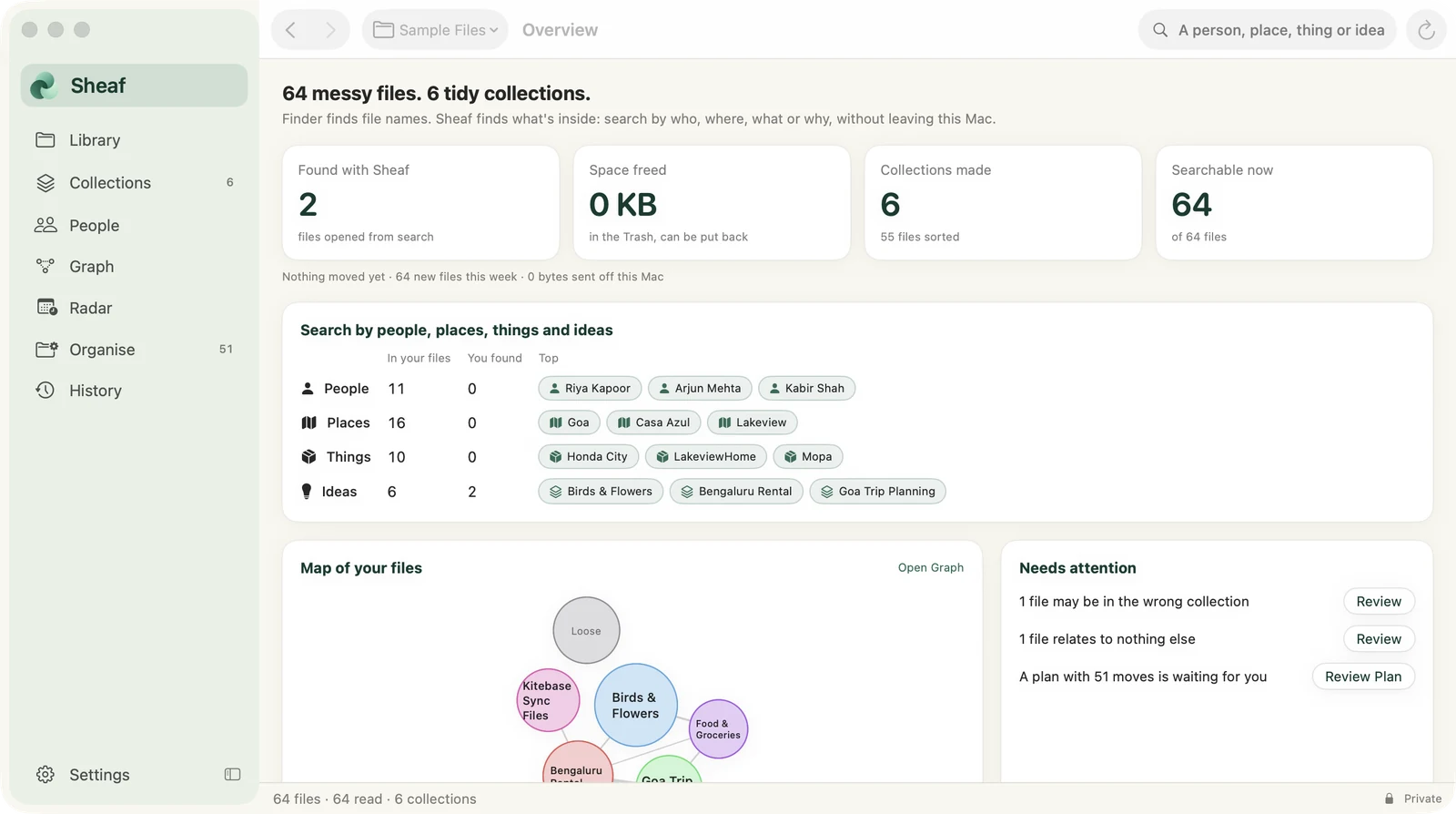
Sheaf Overview: 64 messy files, 6 tidy collections, with the people, places, things and ideas found in the files

Find it by who, where, what or why

Ask in your own words, like “rent agreement”. Sheaf matches meaning and exact words together, so names, amounts and invoice numbers work too, and a PDF opens on the page that matched. The collection it lives in shows above the results.
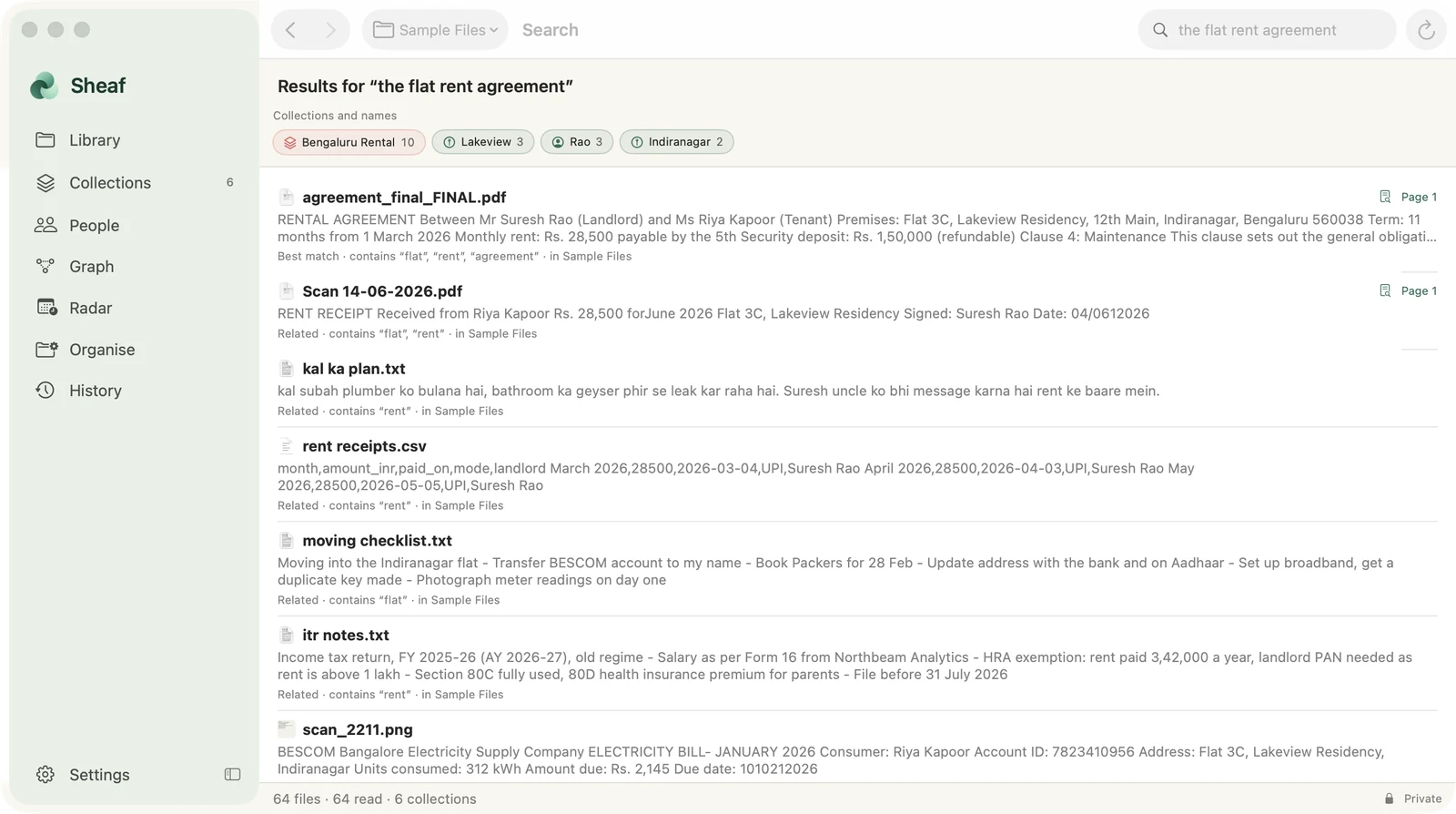
Search results for rent agreement, with the rental agreement first and the Bengaluru Rental collection shown above

Collections that know what they hold

Related files are grouped and named by what they are, never by a person’s name. Sheaf recognises the kind of file, so a CV stays with CVs, a job description stays out of them, a passport photo stays out of your trip photos, and code or licence files stay out of your papers. A file that only loosely fits is marked rather than forced in. Drag to merge or move; undo is one click.
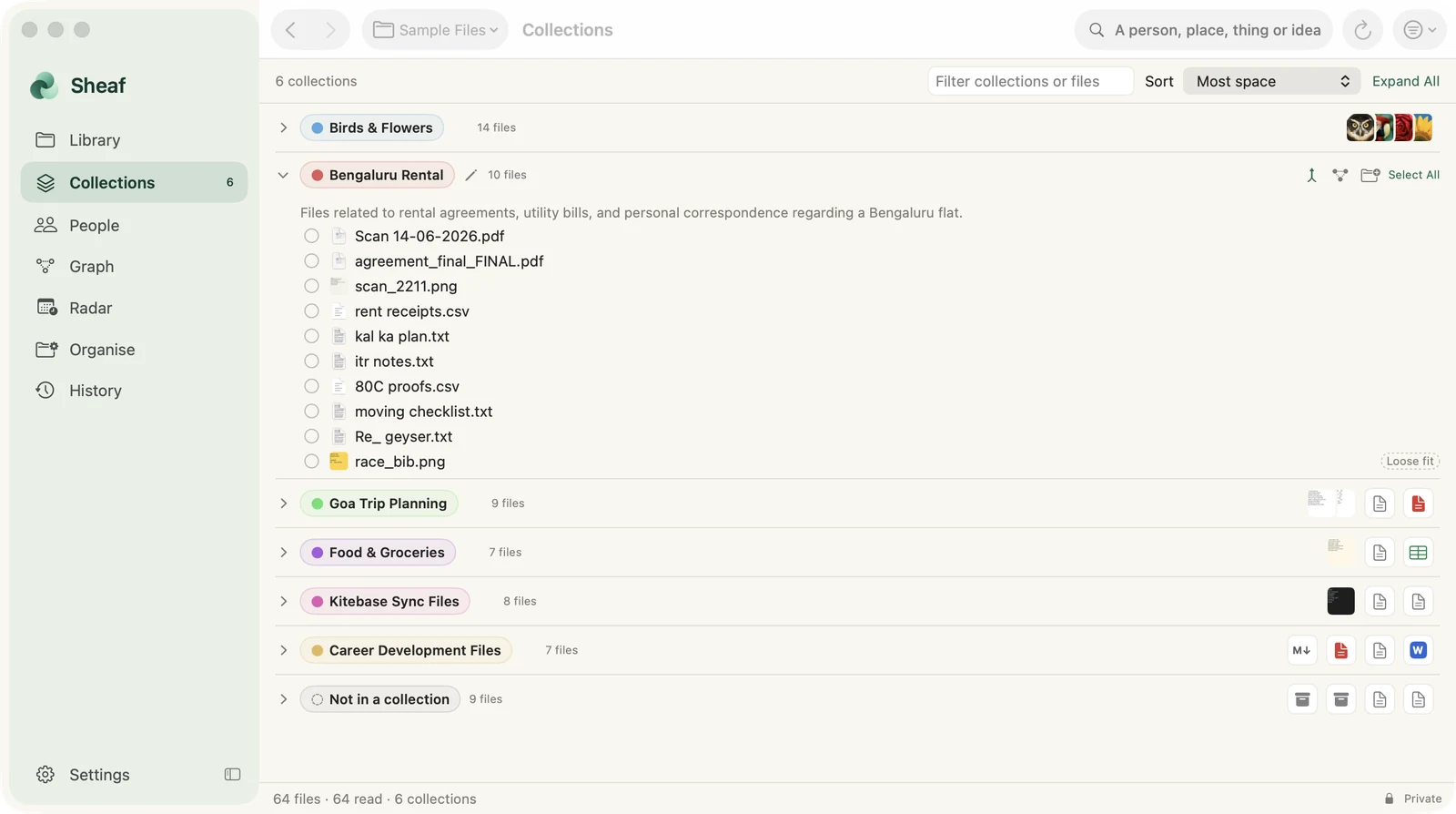
Collections view with Bengaluru Rental open, one file marked as a loose fit

A plan you approve, not a surprise

Each collection becomes a real folder, shown whole with every file and a clearer name. Every move has a checkbox. Nothing happens until you approve, and History puts everything back.
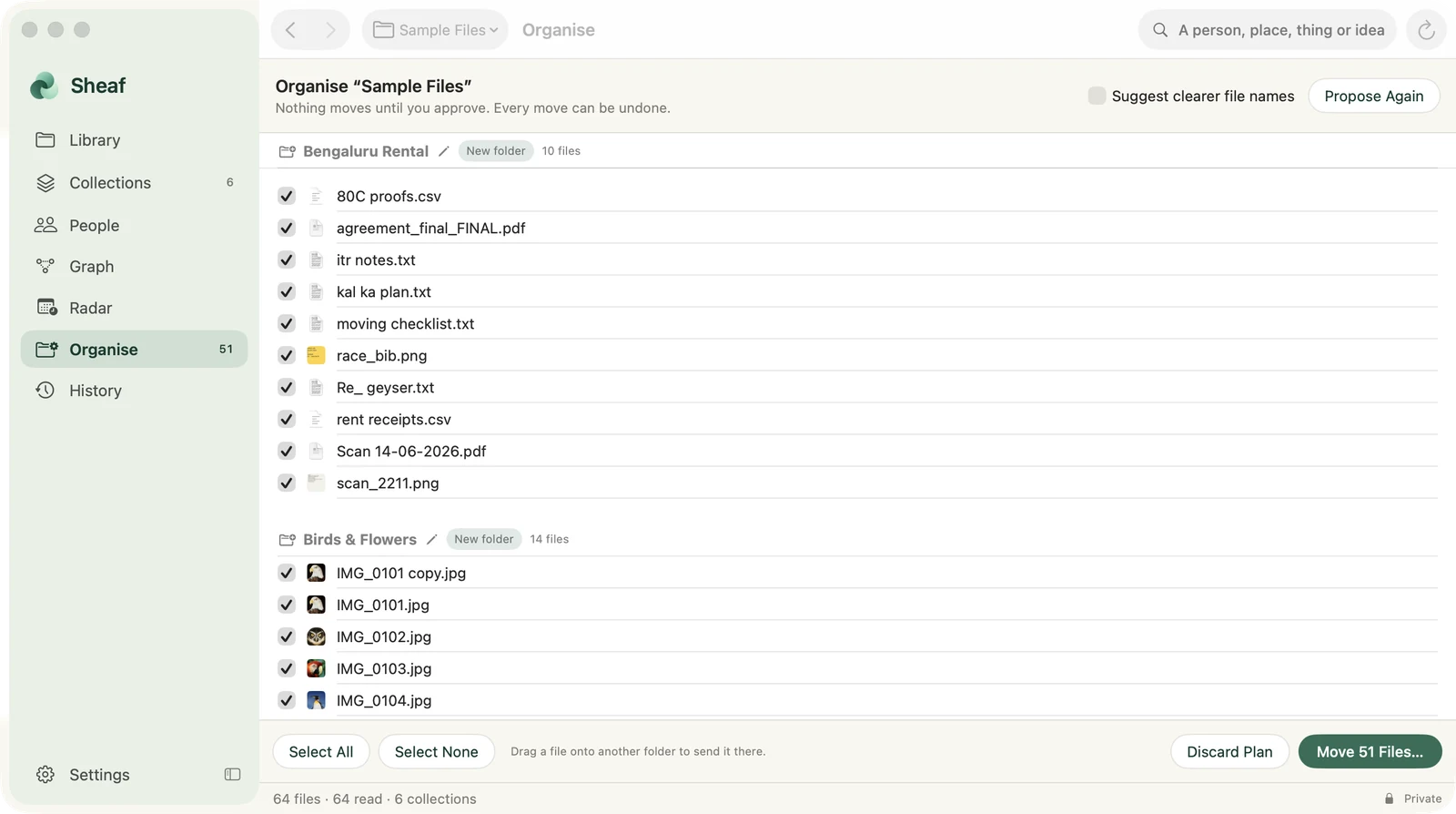
Organise view showing the Bengaluru Rental folder with every file ticked for review

See how everything connects

A map of your collections and the files between them. Step into a collection, follow a file to what relates to it, and spot the files that sit in the wrong place.
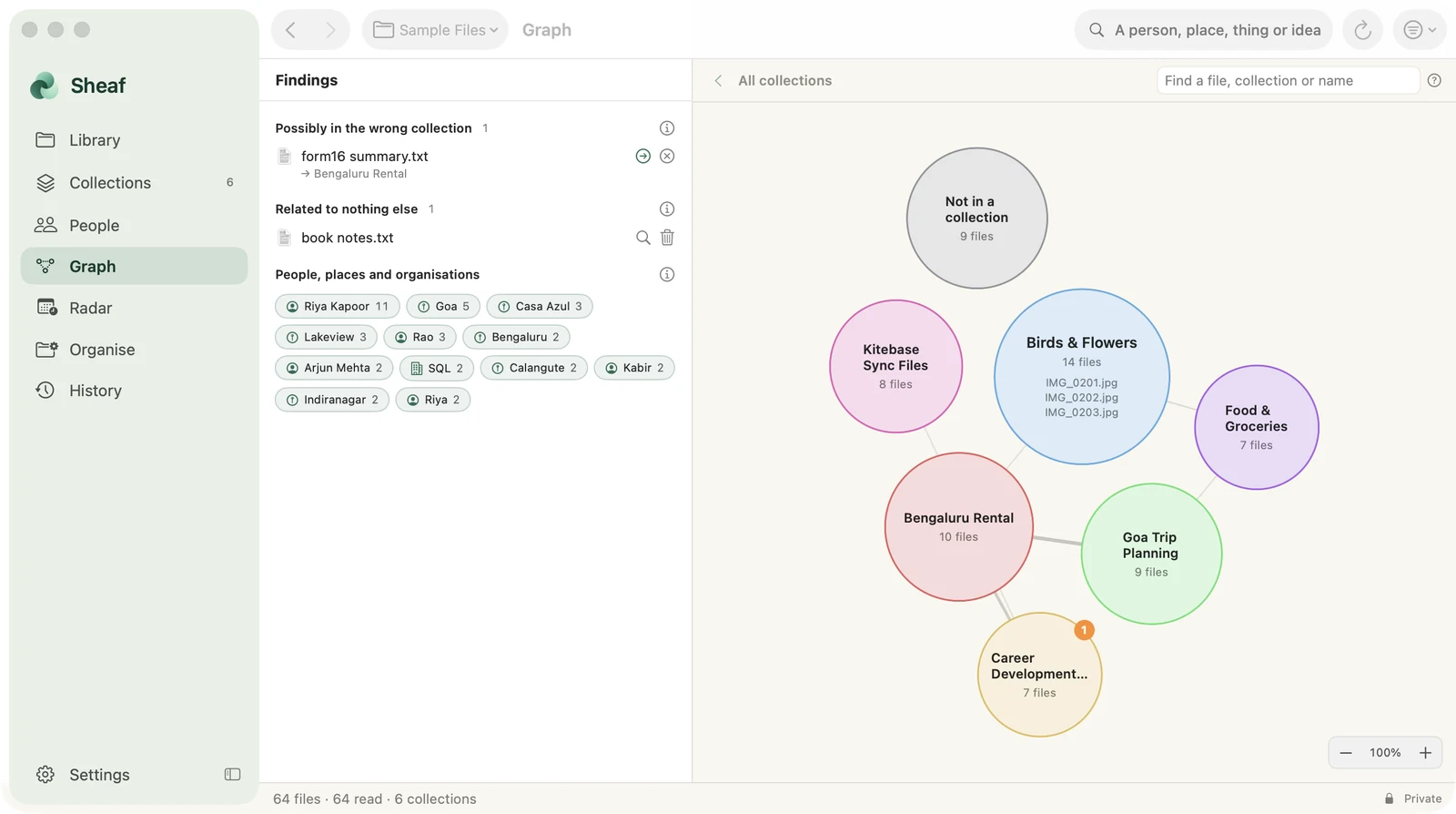
Graph view with collections as bubbles, and a finding that suggests moving a misplaced file
And everything around itShow moreShow less
  • Plain-language filters“pkg files”, “pdfs from last week about rent”, “screenshots over 5 MB”. Read as filters on the spot, with no model needed.
  • Opens on the right pageA PDF result opens on the page that matched, with the words highlighted.
  • Quick panel, anywherePress a shortcut from any app to search. Space previews, the arrow keys move, Return opens.
  • Show one kind of fileHighlight just images, PDFs or installers across Collections and the Graph, or hide the rest.
  • Loose fits, flaggedEvery file gets a fit score from how it links to its collection. Weak fits are marked; clear misfits are left out, not forced in.
  • Broad or detailedKeep related papers together, or split them by kind: marksheets, admit cards, ID papers. Switch any time.
  • Undo anythingEvery move is journaled. Collection edits stay in History, and ⌘Z works long after the note has gone.
  • Picks up where it stoppedQuit halfway through reading and Sheaf carries on from there next time. Nothing already done is lost.
  • Keeps up by itselfWatches your folders and reads only what is new or changed. Collections keep their names as the library grows.
  • Duplicates and spaceFinds exact copies and large leftovers. Anything removed goes to the Trash, where you can put it back.
  • Try it on sample filesWhile the models download, explore every screen on a folder of invented files. Merge, move and undo for real.
  • Problems, reported your wayReport a Problem fills in a GitHub issue for you to read and send. Paths are blanked out. There is no telemetry.

How Sheaf compares

More Mac apps now sort files with AI. This is where Sheaf fits, based on public information checked on 21 November 2026.

SheafFinderHazelSparkle
PriceFree, no accountFree, built into macOSPaid licence, free trialIncluded with a paid Every subscription
How it sortsGroups files by what is inside them and proposes foldersYou make the folders and move files yourselfRules you writeAI folders from file names
Where the AI runsAI that runs on your MacNo AI sortingNo AI sortingFile names sent to a cloud model
SearchMeaning, exact words, and people, places and things; opens the matching pageSpotlight: names and textNot its focusNot its focus
Before files moveYou approve a plan; undo all of itYou move everything yourselfActs as soon as a rule matchesOrganises automatically
AlsoMap of connections, fit score for every file, sample folder to try firstTags and Smart FoldersRename, convert, unarchiveRecents and AI Library folders

Pick Sheaf when you have a messy folder, want it sorted by what the files say, want to find things by who, where or what, and want it free with AI that stays on your Mac.

Details of other products change, so check each vendor. Sources: Hazel, Every on Sparkle. Product names belong to their owners.

Built for files you care about

Designed to run on an everyday Mac, not a workstation.

Private by construction

The AI runs on your Mac. No account, no telemetry.

Safe and reversible

Nothing moves until you approve it, and every move can be undone.

Light on resources

Only new and changed files are read again.

Free, with nothing to buy

Many AI tools charge a subscription and process your files on their servers. Sheaf needs neither.

$0No charge

No subscription, usage fees, ads or account. Core features will not move behind a paywall.

Your MacNo new hardware, no cloud bill

It runs on the Apple Silicon Mac you already have, with local models.

OptionalGive back if it helps you

Nothing is required. A GitHub star, an honest bug report or a note on what grouped badly is how early users help most.

Requirements

Sheaf is a small app. The AI it runs on your Mac is the part that needs space, and it downloads once.

What you need

  • An Apple Silicon MacM1 or later. 8 GB of memory is enough.
  • macOS 14 Sonoma or later
  • Free disk space2.4 GB for the Bigger AI, 1.6 GB for Light. You choose in setup and can switch later.
  • Internet, onceOnly for the download. After that Sheaf works offline.

Getting started

  1. Download and open Sheaf.It is an unsigned beta, so macOS asks you to confirm: right-click, choose Open, then Open Anyway. Install guide
  2. Run the one-time setup.Pick Bigger or Light. Sheaf downloads the AI and installs what it needs.
  3. Add a folder.Or try the sample files first. Nothing moves until you approve a plan.

Beta status

Sheaf works on real folders and is still being built. This is where it stands.

Working today

  • Read-only scan of a folder you choose
  • Local reading of text, PDFs, Word files and text in images
  • Collections from content, with a fit score and the reason shown
  • Search by meaning, exact words, and people, places and things
  • A map of connections, a reviewable plan and one-click undo
  • A sample folder to try every screen first

Known limitations

  • Tested on small and medium folders. Very large libraries are not yet proven
  • Not yet tried on other Macs or macOS versions

Planned

  • Large-library testing and speed work
  • Reading text in rotated scans
  • Spreadsheet, presentation and email readers
  • Signed and notarised releases

Full roadmap  /  Changelog

The source goes public at 100 stars

The source is private while the beta settles. When the Sheaf repository on GitHub reaches 100 stars, the source goes public. Until then, the privacy page lists what you can check yourself.